
 Hitesh Spara
🚀 Project Overview
CrossPlatformLogin demonstrates the power of writing Swift code once and deploying it natively on both iOS and Android platforms. The app features a modern, polished login interface with social authentication options, built using SwiftUI for iOS and automatically transpiled to Jetpack Compose for Android via Skip.

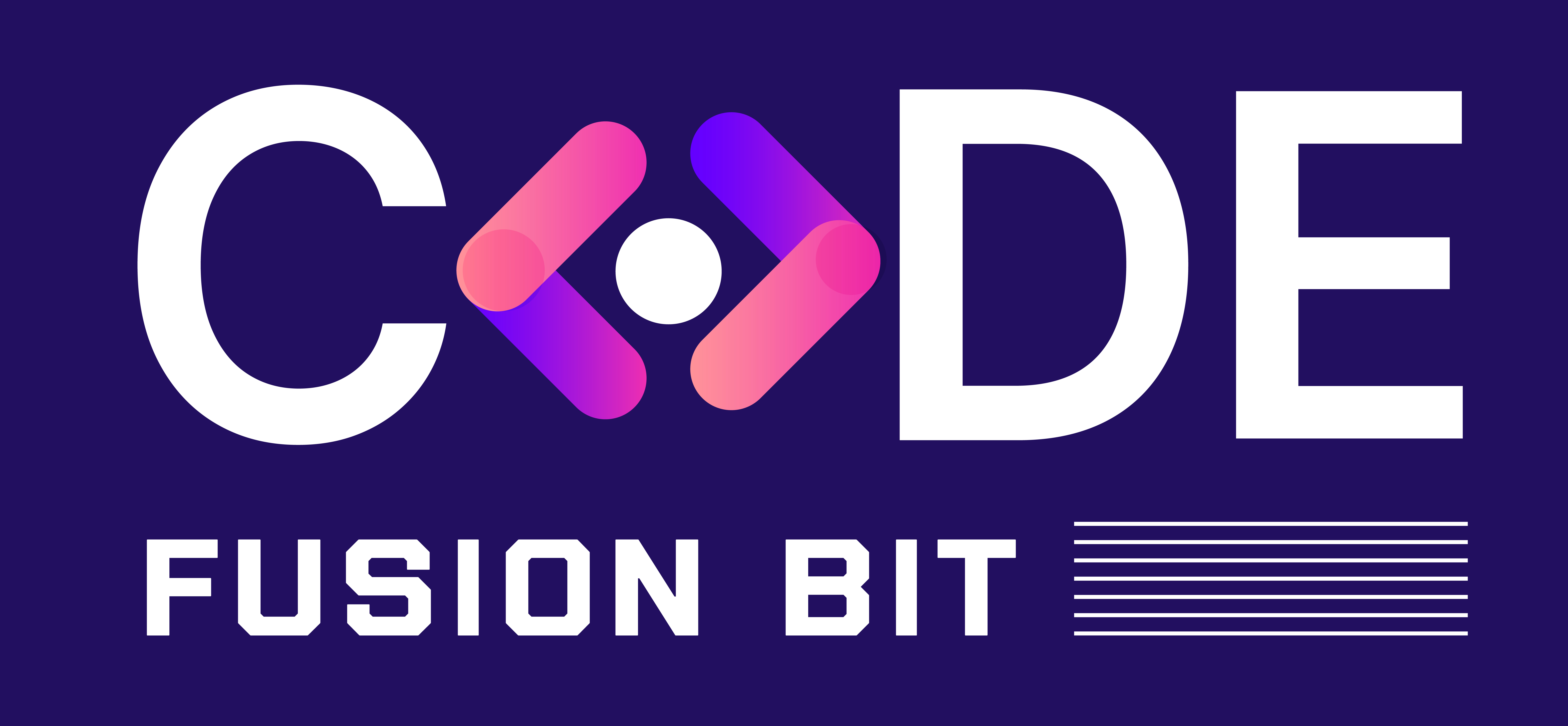
Screenshot 🖼️
✨ Key Features
- 🎨 Beautiful UI Design – Modern, consistent design across platforms
- 📱 Native Performance – True native performance on both iOS and Android
- 🔐 Authentication System – Email/password and social login options
- ⚡ Real-time Validation – Form validation and loading states
- 🌓 Theme Support – Light/dark mode compatibility
- 📊 Data Management – CRUD operations with local persistence
🏗️ Architecture
Tech Stack
- Language: Swift 5.9+
- UI Framework: SwiftUI (iOS) → Jetpack Compose (Android via Skip)
- Cross-Platform: Skip Framework
- State Management: SwiftUI @State, @Observable
- Navigation: NavigationStack with routing
- Data Persistence: JSON file storage
Project Structure
CrossPlatformLogin/
├── Sources/
│   └── CrossPlatformLogin/
│       ├── CrossPlatformLoginApp.swift    # Main app entry point
│       ├── RootViewRouter.swift           # Navigation routing
│       ├── LoginView.swift                # Authentication UI
│       ├── ContentView.swift              # Main app content
│       └── ViewModel.swift                # Data management
├── Tests/
├── Package.swift                          # Swift Package configuration
└── README.md
🛠️ Prerequisites
Before getting started, ensure you have:
- macOS 14+ with Xcode 16
- Android Studio 2025 (for Android development)
- Homebrew package manager
- Android Emulator configured and running
⚙️ Installation & Setup
1. Install Skip Framework
# Install Skip CLI via Homebrew (Recommended)
brew install skiptools/skip/skip

# Alternative: Direct installation (if Homebrew not available)
curl -L https://source.skip.tools/install.sh | bash

# Upgrade to latest version
skip upgrade

# Install Android SDK tools
skip android sdk install

# Verify installation (may take time on first run)
skip checkup --native

# Check Skip version
skip --version
2. Create New Project (Optional – for new projects)
# Create a new Skip cross-platform project
skip init --native-app --open-xcode --appid=com.yourcompany.CrossPlatformLogin cross-platform-login CrossPlatformLogin

# This command will:
# - Create project structure
# - Configure iOS and Android targets
# - Set up Skip transpilation
# - Automatically open in Xcode
3. Clone & Setup Existing Project
# Clone the repository
git clone https://github.com/codefusionbitllp/cross-platform-login.git
cd CrossPlatformLogin

# Resolve Swift package dependencies
swift package resolve

# Open in Xcode
open CrossPlatformLogin.xcworkspace
🚀 Running the Application
Development Mode
- Start Android Emulator via Android Studio
- Open Xcode and select iOS simulator target
- Build & Run (
Cmd+R) – App launches on both platforms simultaneously!
Platform-Specific Testing
# iOS only (Xcode)
- Select iOS Simulator target
- Press Cmd+R

# Android only (Skip)
skip android run

# Both platforms
skip run --all-platforms
📦 Build & Export
iOS Build
# Debug build
xcodebuild -scheme CrossPlatformLogin -configuration Debug

# Release build for App Store
xcodebuild -scheme CrossPlatformLogin -configuration Release archive

# Export IPA for distribution
xcodebuild -exportArchive -archivePath "CrossPlatformLogin.xcarchive" -exportPath "Export/" -exportOptionsPlist "ExportOptions.plist"
Android Build
# Debug APK
skip android build --debug

# Release APK
skip android build --release

# Android App Bundle (for Play Store)
skip android bundle --release
Skip Export Commands
# Export for iOS App Store
skip export ios --release

# Export for Google Play Store
skip export android --release

# Export both platforms
skip export --all-platforms --release

# Export with specific configurations
skip export ios --configuration Release --destination "Export/iOS/"
skip export android --configuration Release --destination "Export/Android/"
Export Locations
- iOS Archive:
Build/Products/Release-iphoneos/ - iOS IPA:
Export/iOS/ - Android APK:
Android/app/build/outputs/apk/ - Android Bundle:
Android/app/build/outputs/bundle/ - Skip Exports:
Export/directory
🔐 Authentication System
Demo Credentials
For testing purposes, use:
- Email:
de**@*****le.comor any valid email format - Password:
password123or any password (6+ characters)
Authentication Flow
// Email validation
email.contains("@") && email.contains(".")

// Password validation
password.count >= 6

// Social login simulation
handleSocialLogin("Apple" | "Google")
Security Features
- Input validation and sanitization
- Secure field for password entry
- Loading states during authentication
- Error handling for invalid credentials
📁 Directory Structure
CrossPlatformLogin/
├── 📱 Sources/CrossPlatformLogin/
│   ├── 🎯 CrossPlatformLoginApp.swift     # App delegate & lifecycle
│   ├── 🧭 RootViewRouter.swift            # Navigation & routing logic
│   ├── 🔐 LoginView.swift                 # Authentication interface
│   ├── 📋 ContentView.swift               # Main app content (tabs)
│   └── 💾 ViewModel.swift                 # Data models & persistence
├── 🧪 Tests/CrossPlatformLoginTests/
├── 📦 Package.swift                       # Dependencies & configuration
├── 🎨 Resources/                          # Images, icons, assets
└── 📚 Documentation/
🎨 UI Components
Custom Components
- LoginView – Beautiful authentication interface
- SocialLoginButton – Reusable social auth buttons
- PlatformHeartView – Cross-platform component demo
- ItemListView – CRUD operations with SwiftUI List
Design System
- Colors: Primary blue, accent purple/pink gradients
- Typography: SF Pro (iOS), Roboto (Android)
- Spacing: Consistent 8px grid system
- Corner Radius: 10px fields, 12px buttons
🏢 Company Information
© 2025 CodeFusion Bit LLP. All rights reserved.
- Website: https://www.codefusionbit.com
- Contact: in**@***********it.com
- Specialization: Cross-platform mobile app development
- Technologies: Swift, SwiftUI, Skip Framework, Flutter, TypeScript, Next.js, Django, and cross-platform development for iOS & Android.
- Technical Project Manager / Team Lead / Developer: Hitesh Sapra (@saprahits)
About CodeFusion Bit
CodeFusion Bit LLP is a leading mobile app development company specializing in innovative cross-platform solutions. We leverage cutting-edge technologies like Skip Framework to deliver truly native experiences across iOS and Android platforms from a single Swift codebase.
📋 Development Notes
Platform-Specific Considerations
// Platform detection
#if os(Android)
    // Android-specific code
#else
    // iOS-specific code
#endif

// Custom extensions for cross-platform compatibility
extension View {
    func platformPadding() -> some View {
        // Different padding for iOS vs Android
    }
}
Skip Framework Benefits
- ✅ Single Codebase – Write Swift, run everywhere
- ✅ Native Performance – No bridge overhead
- ✅ Native UI – SwiftUI → Jetpack Compose
- ✅ Hot Reload – Fast development iteration
- ✅ Package Ecosystem – Access to Swift packages
📚 Documentation & Resources
Official Skip Documentation
- Main Documentation: https://skip.tools/docs
SwiftUI Support: https://skip.tools/docs/modules/skip-ui/ - GitHub Repository: https://github.com/skiptools/skip
Helpful Links
- Skip Community: https://community.skip.tools
- Skip Slack: https://skip.tools/slack
- Example Projects: https://github.com/skiptools
- Release Notes: https://github.com/skiptools/skip-ui/releases
🤝 Contributing & Acknowledgments
- Fork the repository
- Create feature branch (
git checkout -b feature/amazing-feature) - Commit changes (
git commit -m 'Add amazing feature') - Push to branch (
git push origin feature/amazing-feature) - Open Pull Request







I could not resist commenting. Well written!
Useful piece. Really enjoyed reading this. The info about streaming infrastructure
made a lot of sense. Saving this for reference.
I have been researching how streaming works for a project and this post sums it up
perfectly. Cheers.
Stumbled upon this while searching for online video.
Good find. The points about mobile users is spot on.
Actually informative information about streaming technology.
Few people never consider the infrastructure. Forwarded to a colleague who is
interested in media.
Well done read. Better than most clickbait posts
you get on this topic. Author has experience with
what they are talking about. Will revisit.
I work in hosting and this lines up with my experience.
Particularly the points about edge caching. Good to see someone write
about this accurately.
Just finished reading this and wanted to leave a comment.
Really well done. The explanation between CDN providers was really clear.
This is one of the better articles I have come across on this topic.
Gets right into it, just useful information. Appreciate it.
The article is superb and very helpful. The entire platform keeps
delivering.
Awesome site you have here but I was curious if
you knew of any discussion boards that cover
the same topics talked about in this article? I’d really like to
be a part of group where I can get feedback from other experienced people that share the same interest.
If you have any suggestions, please let me know.
Appreciate it!
The article is informative and well presented.
The site is useful and trustworthy.
Thank you.. <3
A valuable contribution to the topic.
Thank you.. <3
I found this article super helpful. Looking forward to reading
more from this site.
Thank you.. <3
It’s very simple to fіnd oᥙt anyy matter оn net ass compared to textbooks, аs І foᥙnd tһis article at this
web site.
Thank you.. <3
Hi there Dear, are you really visiting this web page regularly,
if so after that you will definiitely get nice experience.
Thank you.. <3